Skip to content
Writing

Engineering notes on web, SaaS, AI and outbound.

On the things that actually decide a project: the architecture call that saved a month, the automation that quietly broke, the outbound sequence that finally got replies. Written for the engineer or founder who has to make the same decision next week.
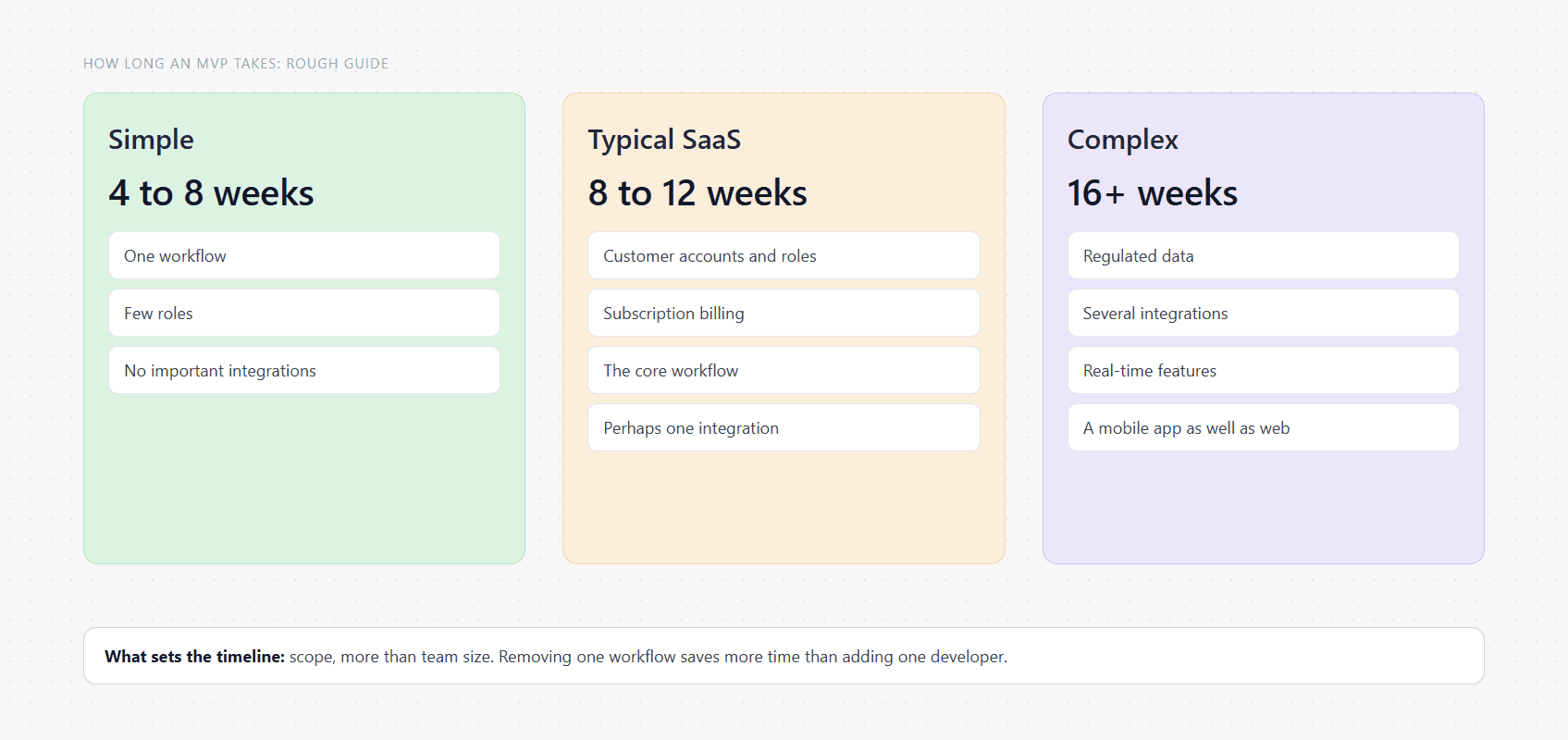
Three MVP sizes with rough timelines. Simple, four to eight weeks: one workflow, few roles, no integrations. Typical SaaS, eight to twelve weeks: accounts, roles, billing and one integration. Complex, sixteen weeks or more: regulated data, several integrations or heavy real-time features. The note underneath says scope sets the timeline more than team size does.
SaaS Development

How long does it take to build an MVP?

A simple MVP takes four to eight weeks, a typical SaaS MVP eight to twelve, and a complex product four months or more. Here is where the time goes, what slows a build down, and how to shorten it without cutting the wrong things.

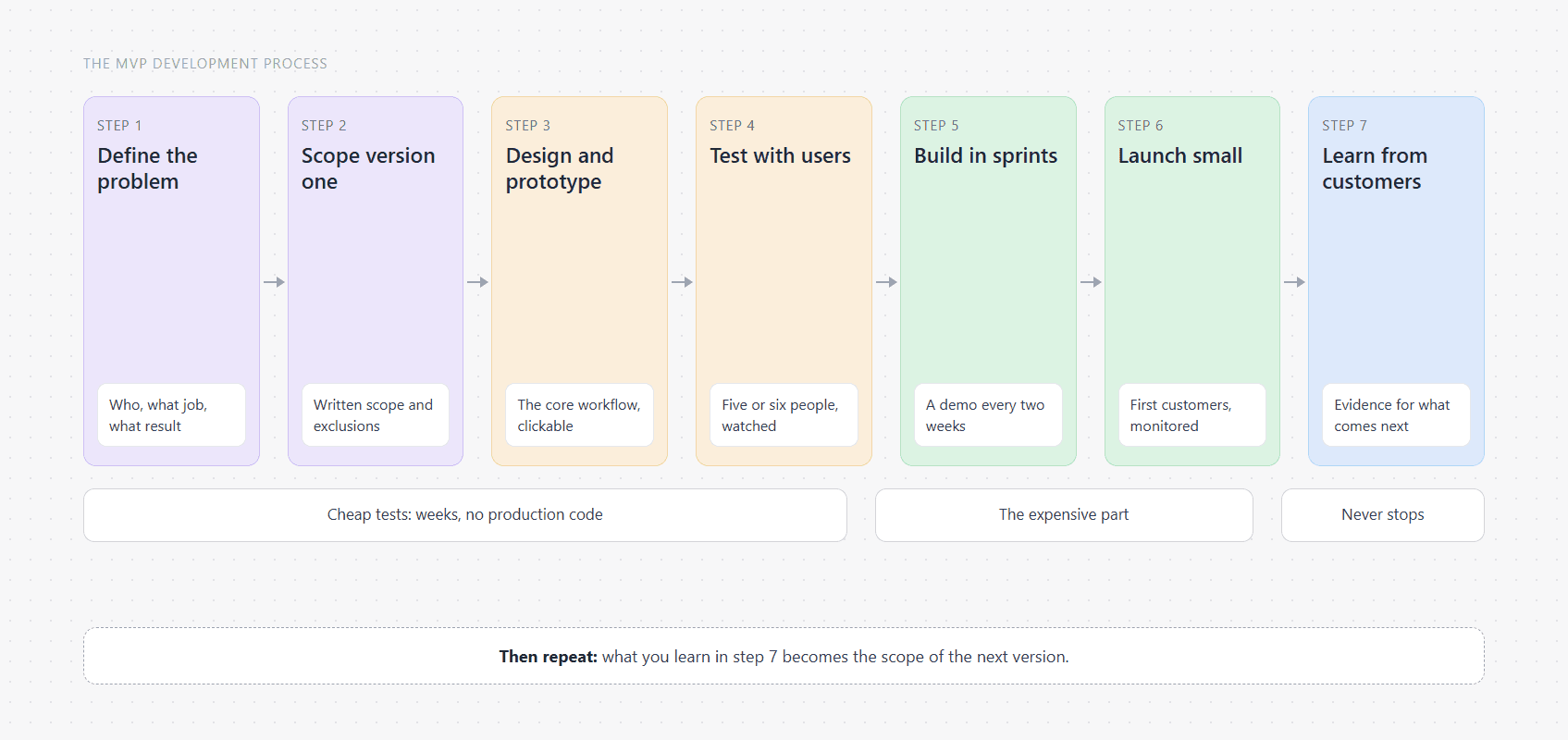
The MVP development process as seven connected steps: define the problem, scope the first version, design and prototype, test with users, build in sprints, launch small, and learn from customers, with what is learned becoming the scope of the next version.
SaaS Development

The MVP development process, step by step

The MVP development process in seven steps, from defining the problem to learning from your first customers: what happens at each stage, what you should have at the end of it, and where projects usually go wrong.

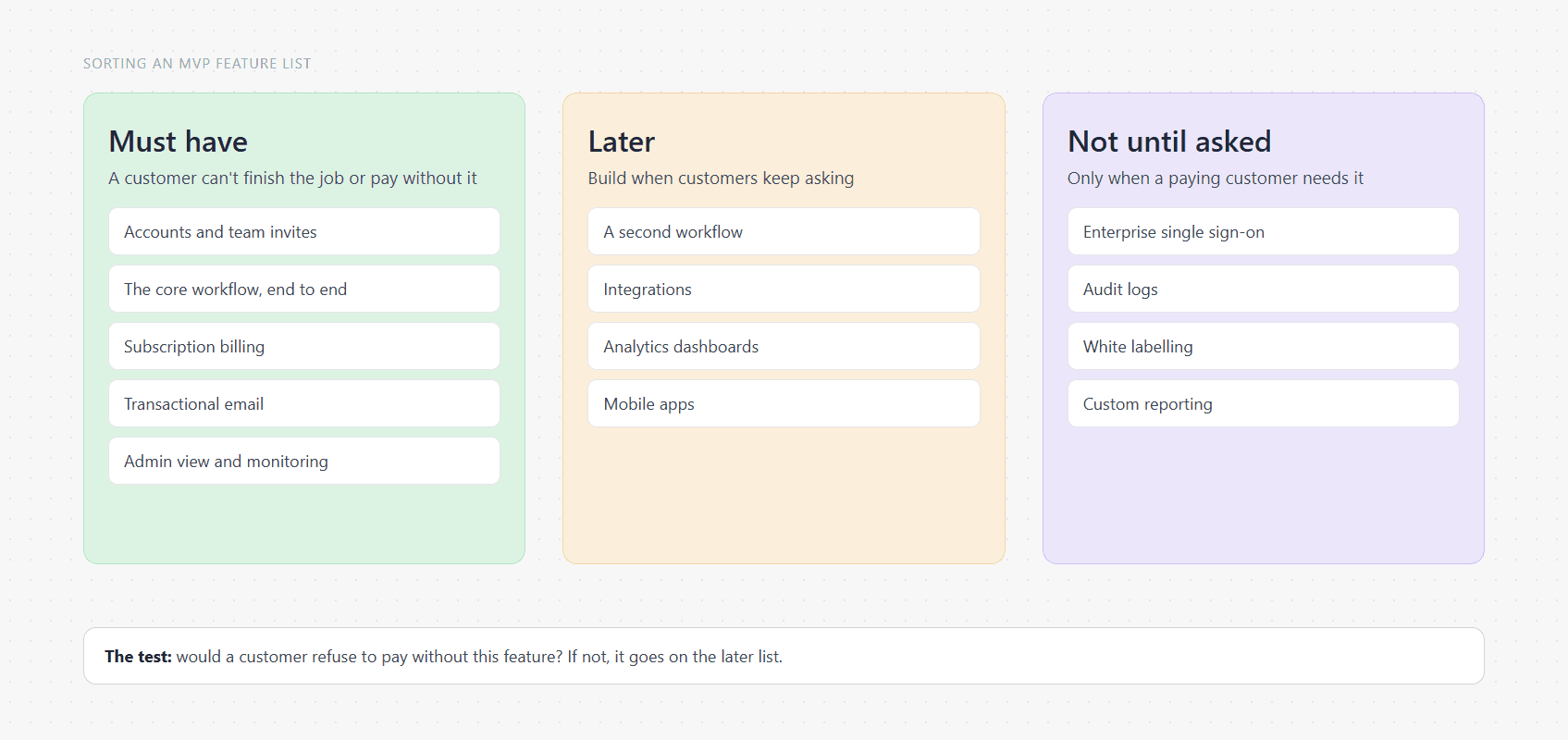
A feature list sorted into three columns. Must have: accounts, the core workflow, billing, transactional email, an admin view, monitoring. Later: a second workflow, integrations, analytics dashboards, mobile apps. Not until asked: enterprise single sign-on, audit logs, white labelling, custom reporting.
SaaS Development

MVP features: how to decide what goes in the first version

How to decide which features belong in an MVP: start from the one job customers will pay for, sort everything else into must, later and never, and use a checklist of what a SaaS first version needs.

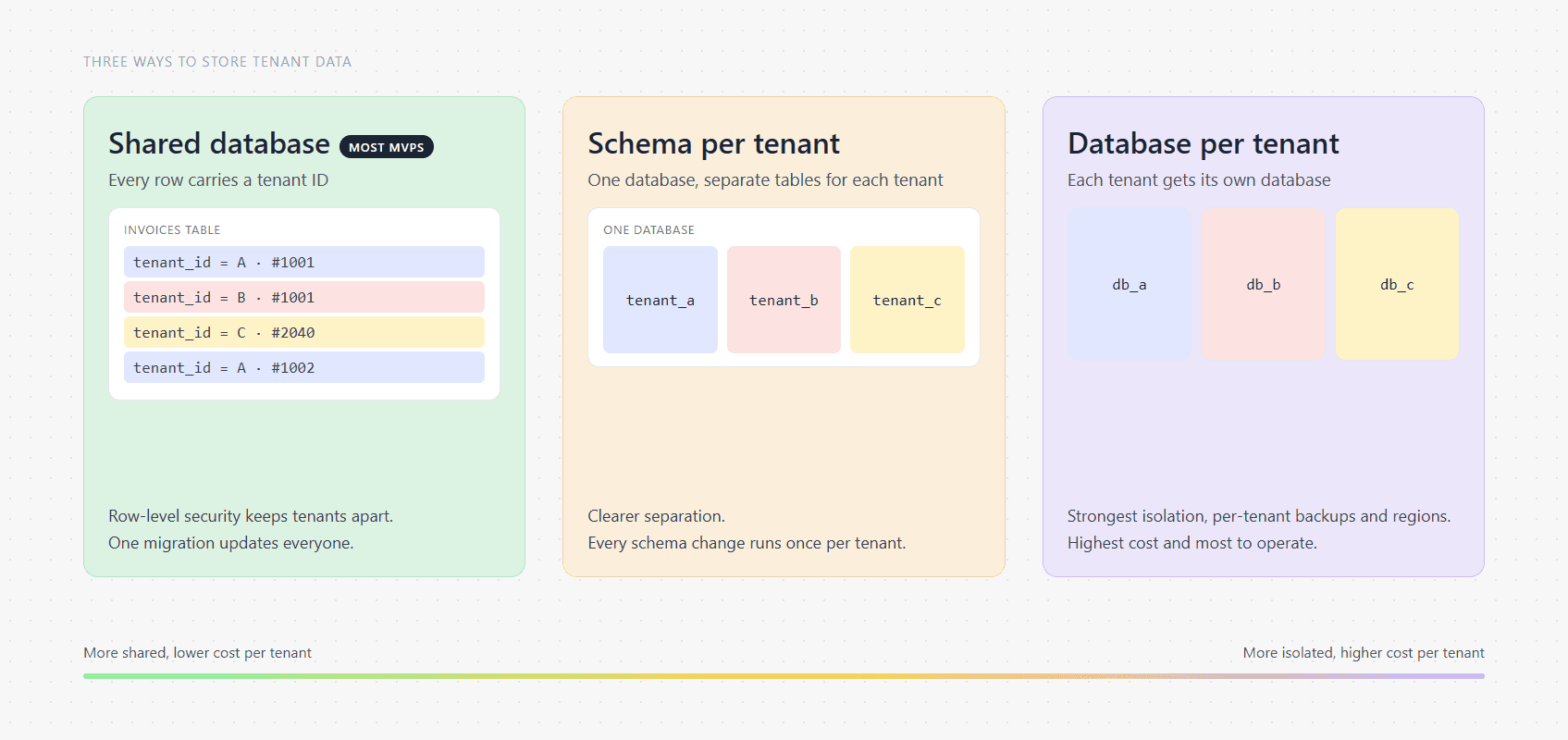
Three ways to store data in a multi-tenant SaaS product, from most shared to most isolated: one shared database where every row carries a tenant ID, one database with a separate schema per tenant, and a separate database for each tenant. Isolation and cost per tenant rise from left to right, and most MVPs start with the shared database.
SaaS Development

Multi-tenant SaaS architecture: the patterns, the trade-offs and what an MVP needs

How multi-tenant SaaS architecture works: the main patterns, three ways to store tenant data, how to keep one customer's data away from another's, and the setup most SaaS MVPs should start with.

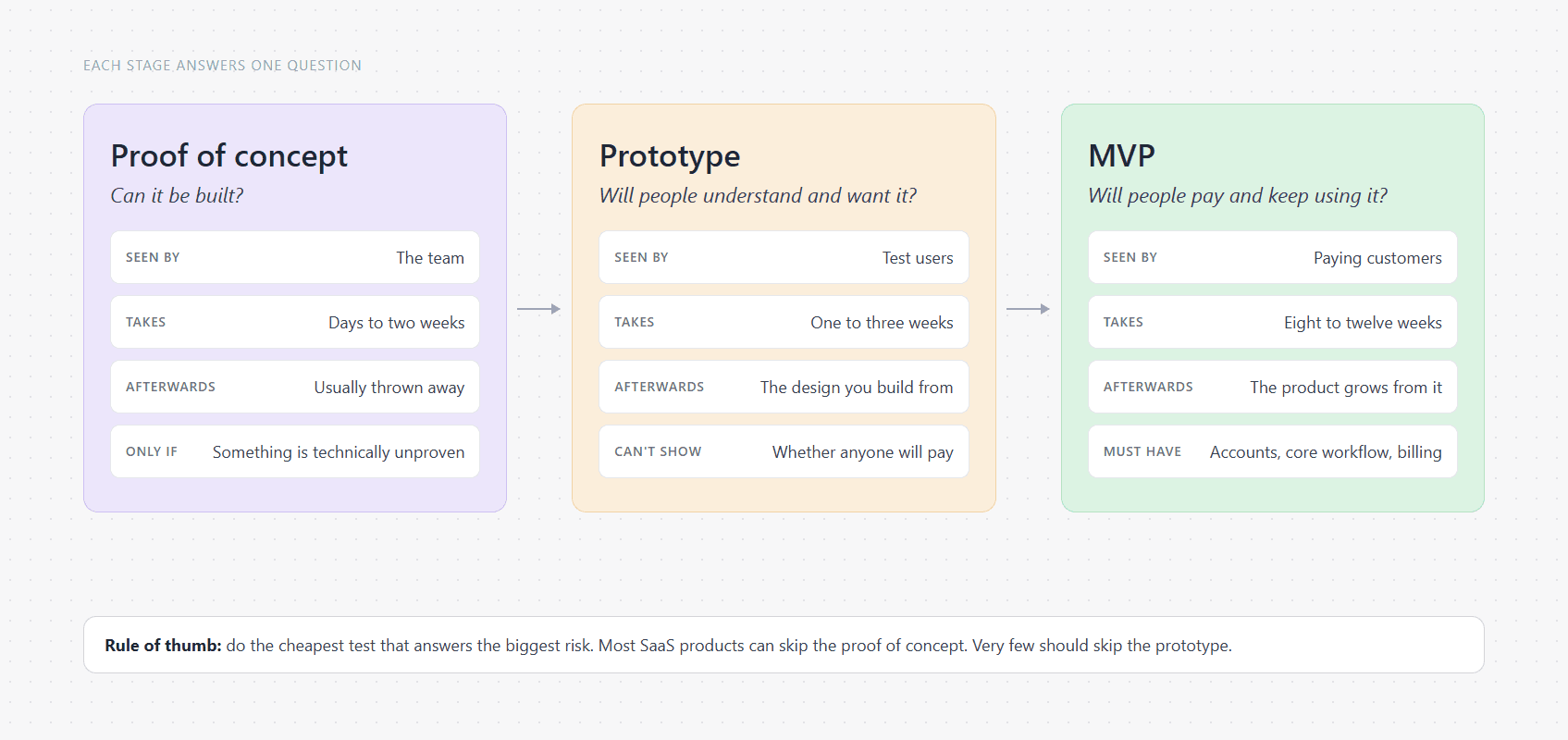
Three stages side by side. Proof of concept: can it be built, seen by the team, days to two weeks, usually thrown away. Prototype: will people understand and want it, seen by test users, one to three weeks, a design to build from. MVP: will people pay and keep using it, seen by paying customers, eight to twelve weeks, the foundation of the product.
SaaS Development

MVP vs prototype vs proof of concept: which does a SaaS product need first?

A proof of concept tests whether something can be built, a prototype tests whether people understand and want it, and an MVP tests whether they will pay and keep using it. Here is how to tell which one your SaaS product needs first.

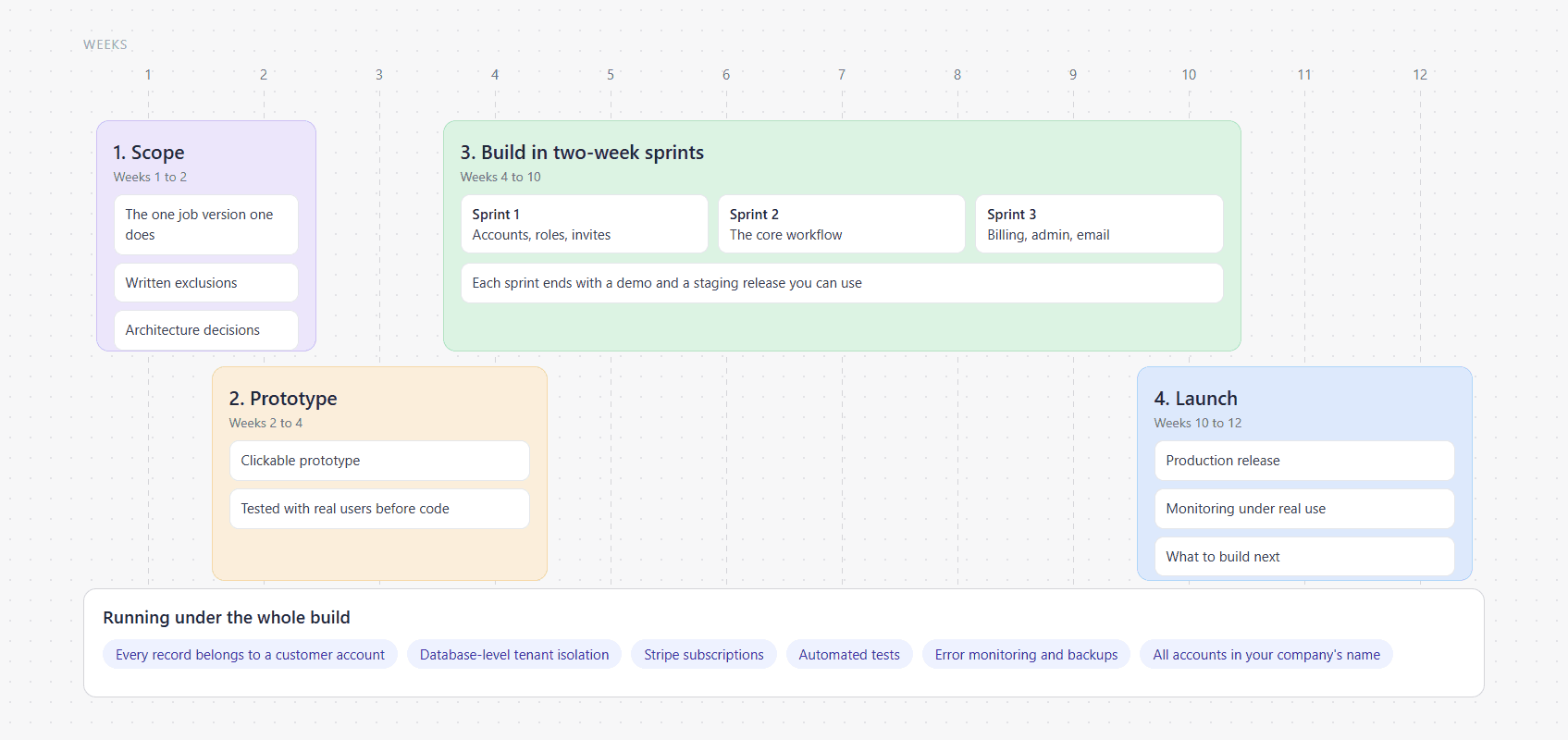
Timeline of a SaaS MVP build over twelve weeks in four phases: scoping in weeks one and two, a clickable prototype in weeks two to four, two-week build sprints from week four to ten, and launch with monitoring in weeks ten to twelve, with tenancy, billing and tests running underneath the whole build.
SaaS Development

SaaS MVP development agency: how to choose one, and what version one should include

What a SaaS MVP development agency should build in the first eight to twelve weeks, the questions that separate a good one from a risky one, what to leave out of version one, and what you should own when it hands over.

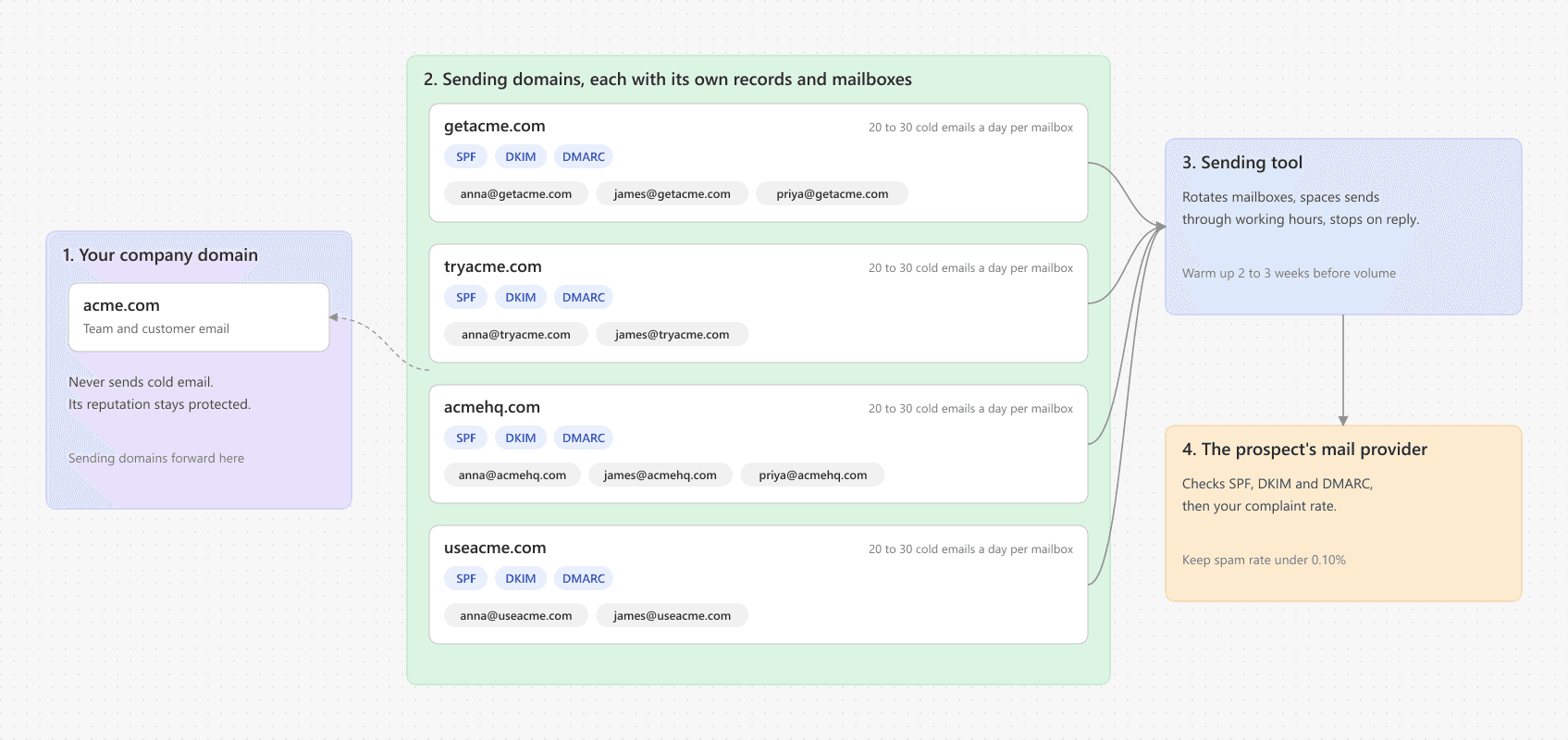
Diagram of a cold email infrastructure: a primary company domain kept separate from four sending domains, each with two or three mailboxes and its own SPF, DKIM and DMARC records, all forwarding to the main website.
GTM & Lead Generation

Cold email infrastructure: domains, mailboxes and DNS, step by step

How to set up cold email infrastructure that lands in the inbox: separate sending domains, Google Workspace or Microsoft 365 mailboxes, SPF, DKIM and DMARC records, warm-up, and the daily limits that keep it working.

Bar chart of Total Blocking Time on a throttled phone before and after the fixes: service page 1,199 ms to 568 ms, blog article 1,000 ms to 473 ms, home page 1,034 ms to 336 ms.
Website Development

Core Web Vitals on a 3D website: what we fixed on our own Next.js site

Our own site runs WebGL scenes on almost every page. Here is how we measured its Core Web Vitals on a slow phone, the four fixes that made the biggest difference, the numbers before and after, and what is still too slow.

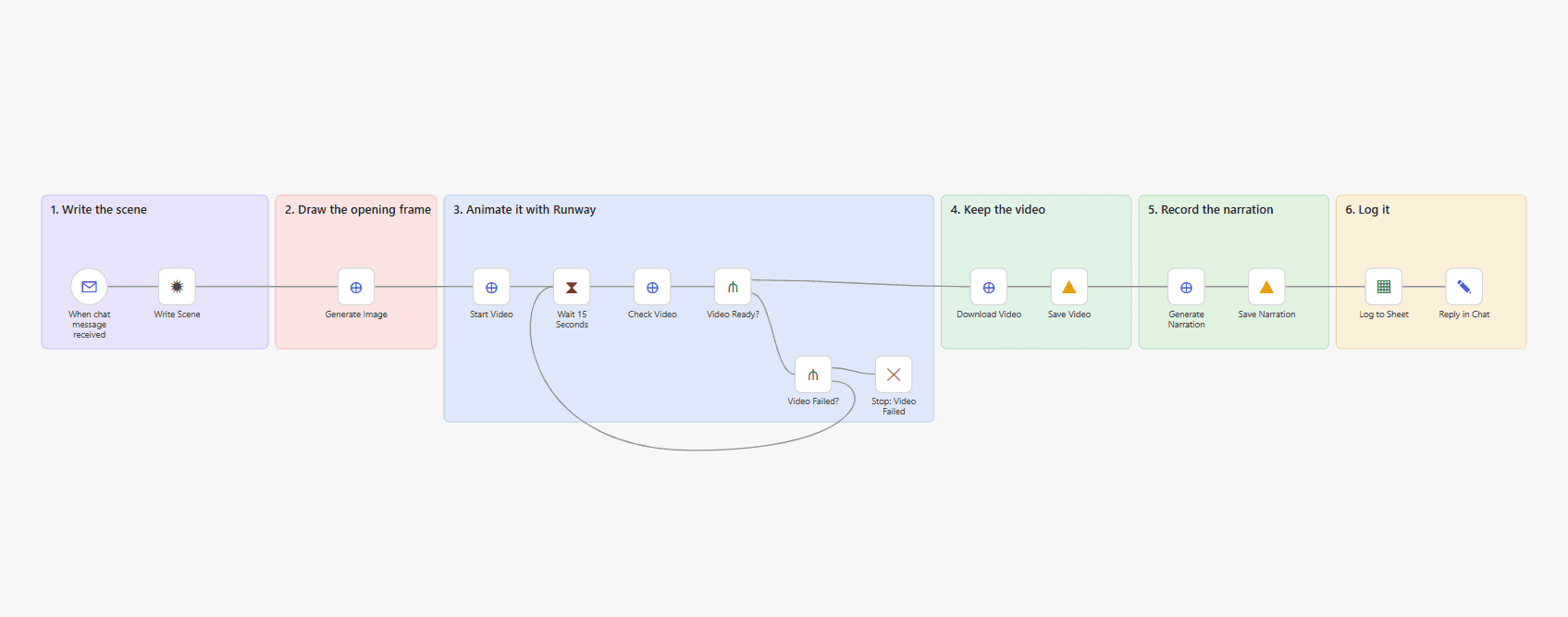
The n8n canvas for the AI video generator in six labelled groups: write the scene from a chat message, draw the opening frame with GPT Image, animate it with Runway inside a status-check loop, save the video to Google Drive, record the narration with ElevenLabs, and log both links to a Google Sheet.
AI AutomationsIncludes a download

n8n AI video generator: free template, prompts and workflow JSON

An n8n workflow that turns one chat message into a 5-second vertical video with a voiceover: GPT Image draws the first frame, Runway animates it, ElevenLabs narrates it, and Google Drive keeps the files.

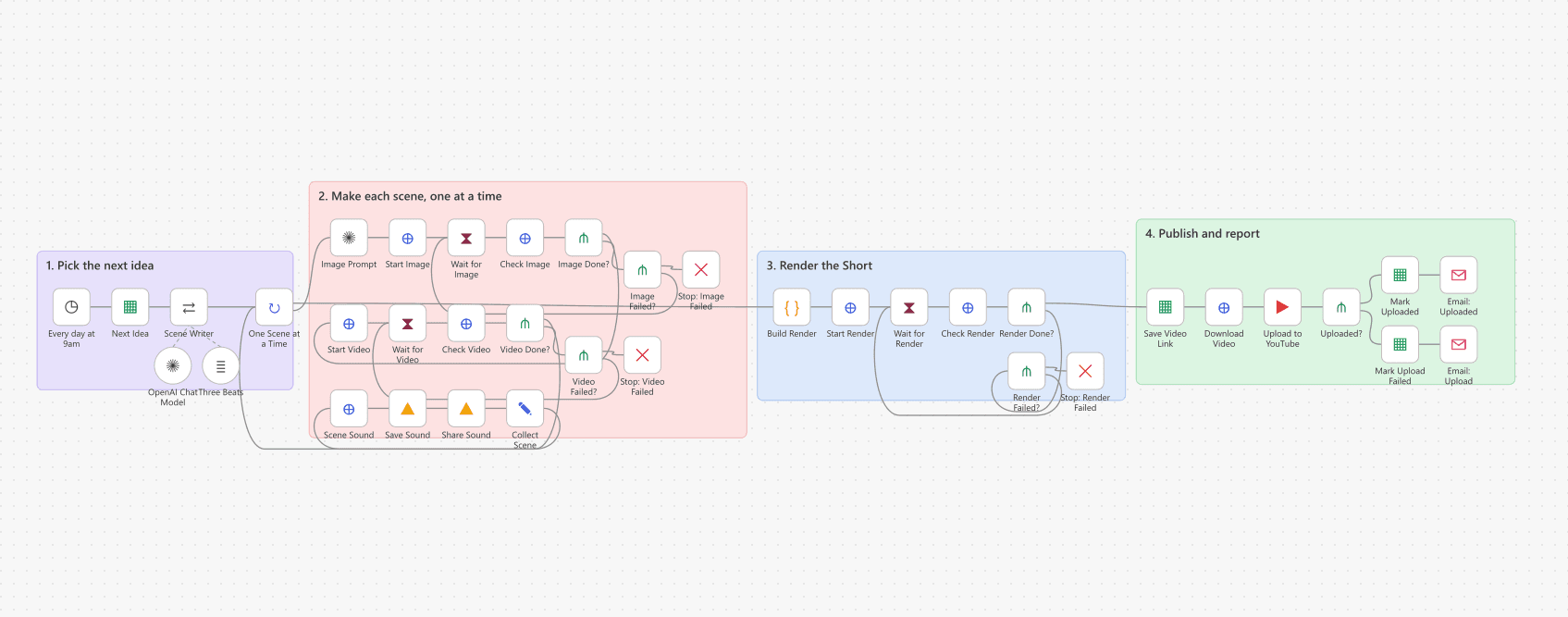
The n8n canvas for the YouTube Shorts generator in four labelled groups: pick the next idea from a Google Sheet, make each scene one at a time with image, video and sound polling loops, render the Short in Creatomate, then upload privately to YouTube and email the result.
AI AutomationsIncludes a download

n8n YouTube Shorts automation: free template, prompts and JSON

An n8n workflow that turns one row in a Google Sheet into a 15-second first-person YouTube Short: three AI-written scenes, Flux images, Kling clips, ElevenLabs sound, a Creatomate render and a private upload.

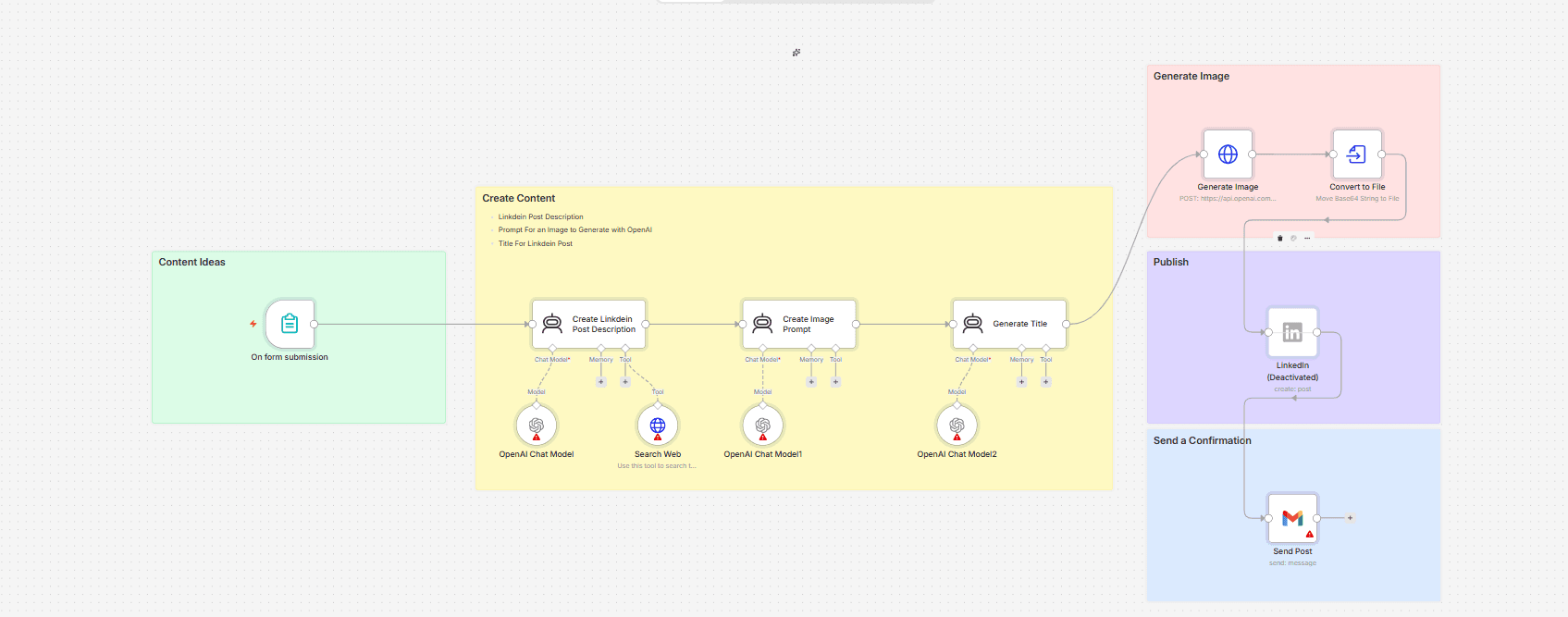
The n8n canvas for the LinkedIn post generator, showing five labelled groups: the form trigger, three chained AI agents, the OpenAI image request with a Convert to File node, a disabled LinkedIn node and a Gmail confirmation.
AI AutomationsIncludes a download

n8n LinkedIn post automation: free template, prompts and JSON

An n8n workflow that turns one form submission into a LinkedIn post, a matching image and a draft in your inbox. Three AI agents, an OpenAI image call, and a LinkedIn node we keep switched off on purpose.

The work behind the writing

Ready to build something that pays for itself?

Tell us what you need and get a written scope, timeline and fixed quote within 48 hours of a free 30-minute call, whether you work with us or not.

Replies within 24 hours · NDA on request · No commitment